Log in to save this article and keep your favorite resources in one place.

In my role as CIO of Johnsonville, I am analyzing indirect access, the impact of digital access licensing, and the pros and cons of adopting the new licensing model. I have committed to documenting that process and sharing insights with you in a series of blog posts. In the first post, I provided some background and laid out Johnsonville’s high-level approach to the process. In this post, I will cover the initial steps we took to get an understanding of our indirect access exposure and an estimate of documents required to address that exposure under the SAP Digital Access licensing model.
Before I continue, I need to note my lack of technical knowledge. I have great folks at Johnsonville who are experts in security, BASIS, ABAP, and config and have tried mightily — in a very short time — to educate me on SAP technical jargon. I have done my best to learn, however, I may have butchered some technical details here.
And now, back to my favorite topic — indirect access.
Starting with the Basics
Like many SAP customers, Johnsonville is a bit apprehensive about inviting the SAP Audit and Sales teams into its environment to discuss indirect access without first having a good understanding of what our potential exposure may be. Our approach will be to perform as much due diligence as we can internally and then engage the SAP teams to evaluate and fine-tune our findings.
For our initial assessment of indirect access we took a four-step approach:
Step 1: Identify the interfaces with SAP that could be generating indirect access.
Step 2: Identify the user IDs that are embedded in interfaces, whether they be batch or real-time jobs.
Step 3: Run the SAP Digital Access Estimator Tool using the identified user IDs to get initial document counts.
Step 4: Evaluate results from the estimator tool to identify missing documents and areas to explore. Based on these results and identified missing documents, repeat steps 1 – 4.
Identifying the Interfaces
Interfaces with third-party solutions will be the primary points where indirect access manifests within our SAP landscape. At Johnsonville, our main interface technologies include EDI, SAP PI/PO, and ABAP code using existing IDoc, BDoc, BAPI, and BADI capabilities. Johnsonville does not use third-party integration tools.
Fortunately, the number of integrated third-party applications and service providers we use at Johnsonville is relatively low. Third-party applications (on-premise and SaaS) include transportation management, time and attendance, Manufacturing Execution System (MES), claims and deductions processing, and maintenance planning. Our most prevalent interface is EDI, which we rely on to integrate our 3PL network, customers, benefits providers, and select suppliers.
Identifying the User IDs
The next step in the process was to identify all the potential user IDs that were embedded in these interfaces. Some of these were very easy to identify, like batch EDI. Much of our EDI processing occurs with two “EDI BATCH” user IDs, so those were easy to isolate. Getting a list of all non-dialog users from our security team was straightforward and provided all of the IDs that were potentially embedded in batch integration jobs.
From there, the process got a bit more interesting. Some of our interfaces are foreground jobs executed with a named user, and others use a system/technical user ID that is configured as a dialog user. We were not smart enough on the first couple passes of the estimator tool to identify these users — it required us to analyze the results and identify missing document counts that we knew should be there. (More on that later…)
Running the SAP Digital Access Estimator Tool
The first step here is to download the appropriate notes from SAP. There are two notes available that provide the document estimation tools: one for SAP ECC systems and one for SAP S/4HANA.
At Johnsonville, we have two ERP landscapes — SAP ECC and SAP S/4HANA. The SAP ECC landscape is limited to our HCM implementation, while the SAP S/4HANA landscape is our core ERP system.
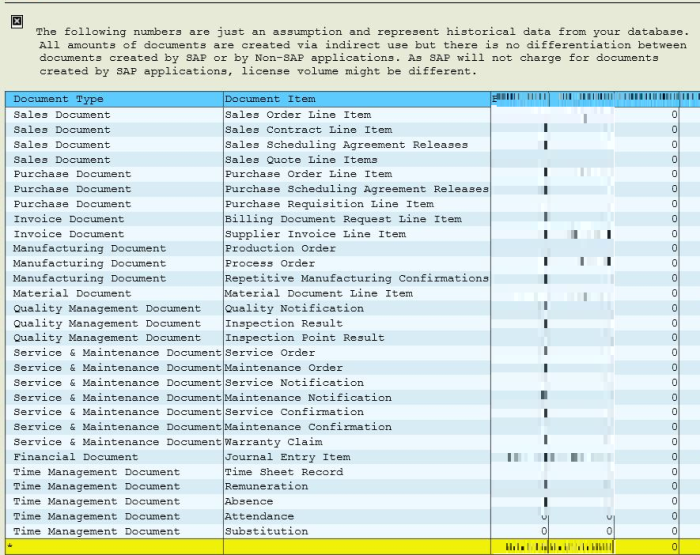
According to our BASIS team, downloading and applying these notes is a simple process that takes just a few minutes. Running the estimator tool is straightforward as well. Simply provide a date range, the user IDs you are interested in, and select whether you want detailed (Display Technical Users check box) or summarized results. Within our 1 TB system, the reports generate in under a minute. If you select the Display Technical Users option, you will see document counts by user for each of the document items. The summarized version simply reports total document counts by document item.
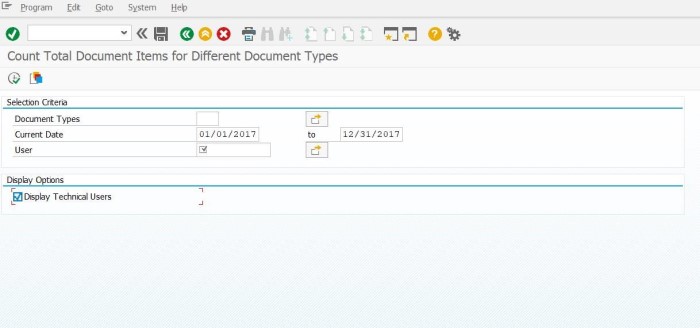
In the report example below, we chose the Display Technical Users option. This provides a column with document counts for each user included in the report.
Evaluating Johnsonville’s Digital Access Results
Based on our initial analysis and our current integrations, we believe we have three areas of concern that need further investigation and clarification.
Area 1: Time and Attendance Integration with ECC HCM
The first is our integration between our time and attendance system and our ECC HCM environment. Today, we use a third-party system for the collection of time and attendance records for our hourly members. This information is uploaded to the Cross-Application Time Sheet (CATS) solution via a foreground job submitted by a named user (dialog user). A standard CATS transaction is then used to transfer data to the HCM infotypes for our normal payroll processing. In our initial runs of the estimator tool, we excluded all named dialog users. As a result, we were missing the documents created by the upload from the time and attendance system to CATS. As we dug into the interface (developed in 2004), we discovered that it was a foreground job using the named dialog user. When we included all the named users that process time and attendance data in the list of technical user IDs, we were able to see the document counts on the report.
We have just started exploring this particular use case with SAP and have raised some interesting questions that need clarification and answers. In the absence of any special licensing (Employee Users, Negotiated Entitlements, etc.), the transfer of time and attendance records to HCM to enable payroll processing from a third-party time and attendance solution is considered indirect access. Under the SAP Digital Access model, the answer about whether or not the transfer of time and attendance records is relevant (i.e., will be counted against your document count) depends on HOW and WHERE those records ultimately end up in HCM. (More to come on this topic in my next blog post.)
Area 2: EDI for Integration
Our second area of concern is centered around EDI and our use of EDI as the primary integration technology for our entire order to cash, logistics, warehousing, and transportation processes. In 2003, we licensed the Sales and Service Order Processing Engine (SSOP) to cover our use of EDI for these scenarios. (SSOP is licensed based on customer orders.) In our environment, we have SAP warehouses configured for each 3PL to track and manage inventory. Initial discovery on this topic has raised a number of concerns and questions regarding entitlements granted with our SSOP license and assumptions we made regarding those entitlements. (SSOP entitlements vary for each SAP customer.) Specifically, we have open questions in the area of inventory management with the 3PLs (inventory moves, adjustments, etc.). We believe that transactions directly related to the customer order are covered (Order Creation, Shipment Notification, Invoice, etc.). It is all of the other transactions that support order fulfillment that are open for discussion.
Another area that warrants further discovery is our integration with our third-party transportation management provider. In the transportation management case, all users have named user licenses for SAP, so we should be compliant. As we evaluate the document-based licensing model, however, we will have to understand where we will be essentially paying twice (named users and documents). Ultimately, those users do more than just interact with the transportation management system, so trading in the named user licenses to cover the cost of the documents in the SAP Digital Access model is not an option. Transportation management is not the only area where this double dipping will be an issue — it will potentially occur in our time and attendance use case, as well.
Area 3: Robotic Process Automation (RPA) and Indirect Access
The last issue we need to address is a gray area in the indirect access/SAP Digital Access model discussion. That is the use of Robotic Process Automation (RPA) and RPA-like tools that automate the process of creating and maintaining documents. These tools typically sit on top of SAP GUI or other standard SAP user interface technologies. My questions here revolve around the SAP Passport technology. How will that technology distinguish between a hands-on-keyboard user and a robot that is using the GUI technology?
Here is a hypothetical scenario: If I convert my EDI interface from a background job using a non-dialog technical user to an RPA tool using a named dialog user and convert to the SAP Digital Access model, do I need to license the documents created by the RPA tool? I’m not saying Johnsonville would do this, or if it is even practical or ethical, but it does help highlight the issue. The use of RPA and RPA-like tools to automate the document creation process will only grow. SAP has even bought and is its own RPA tool–Contextor.
Where We’re Going from Here
As I put the finishing touches on this blog post, I am on a flight to the SAP offices in Newtown Square, Pennsylvania to begin conversations with members of the SAP Global License and Audit and Pricing team. ASUG will have much more to come on the topic of indirect access and the SAP Digital Access model as we continue to engage SAP in this discussion while Johnsonville is in its discovery phase.
Beyond getting clarity on our specific entitlements and current exposure to indirect access, other questions I will attempt to answer in the upcoming weeks include:
- How do we address the double dipping issue? I am definitely looking forward to the upcoming negotiation cycle as we work to understand the total costs of converting to digital access.
- What options do we have for our HCM interface besides a rewrite of the interface? For instance, given the overwhelming number of hourly members in our plants and that we are fully licensed for Manufacturing Intelligence, Integration, and Analytics (MII), can I use MII to gather time and attendance data and interface to CATS?
- How does the new passport technology count integrations with foreground jobs and named dialog users?
- What about RPA tools that essentially create documents through a dialog user? Is it OK if I set up an RPA tool to create documents because it is using a named dialog user in a foreground job versus a technical user ID (non-dialog) in a batch mode (e.g., EDI)? Could I convert my EDI interface to an RPA-based tool and be considered compliant under the SAP Digital Access license model? Can the passport technology distinguish between a bot and a hands-on-keyboard user? If not today, what about in the future? Will I now have a new compliance issue if the technology becomes available to distinguish an RPA bot from an actual human?
Looking forward to recapping the learnings from my meetings with SAP in the next blog post. Hang in there as we continue moving through this process.
Visit our Licensing Resource Center for in-depth coverage of this topic. You can also send your questions to licensing@asug.com or register for one of our licensing webcasts for ASUG members. Additionally, we welcome all ASUG members to submit their ideas for blog posts they want to write.
You Might Be Interested In

Log in to save this article and keep your favorite resources in one place.

Log in to save this article and keep your favorite resources in one place.

Log in to save this article and keep your favorite resources in one place.

Log in to save this article and keep your favorite resources in one place.